Monday, October 15, 2012

Croptoberfest Feature - Lila

Okay Ladies - hear this!  You are never too young or have too many children to attend a workshop!  And, Lila's here to prove it.  At only 7weeks old, Lila has made her debut at a workshop.


Lila is the 3rd child of my customer, Beth.  Beth does not let pregnancy or lots of little ones afoot stand in the way of her family albums.  At 9months pregnant, Beth was at my August workshop.  With 7week old Lila in tow for just a portion of the event, Beth attended the entire Croptoberfest weekend!

Lila didn't sleep much cuz she was very curious about cropping!
However, until Kristen showed up and Lila smiled and cooed at her, Laura was Lila's favorite.  A little rocking back and forth in the kitchen and Laura had Lila snoozing away.


I met Beth when her first child, Logan was only a few months old.  She attended a scrapbook class at the local adult school where I was teaching.  A few years later, Riley came along and he attended a few workshops with his mom...

Riley and Beth 2009


Then Saturday, Lila decided to have an outing for the Saturday afternoon portion of the weekend event and let me tell you - that girl can crop a photo!  Personal trimmers are no trouble for her.

Beth and Lila 2012


Don't hesitate to ask a pregnant mom or a mom with a 7week old baby to attend a workshop - what do you know, they just might come!

Croptober Design Board - Hocus Pocus Theme

At my specialty events I always make up some inspirational designs and post them around the house on design boards.  For Croptoberfest 2012, one of the themes I used was the Hocus Pocus products, namely, the Hocus Pocus Stack Pack and the Hocus Pocus Layered Stickers.

Product ImageProduct Image

This is my first time using a 6X6 stack pack and the layered stickers are pretty new so I hadn't tried them out either.  All in all, I really like them BOTH!

The stack pack is cool.  It's a great product to show your customers because mine really didn't understand what to do with a bunch of tiny square papers until I showed them.  I promise you that my customers will be really looking forward to additional stack packs after this!

The top of the stack pack has several pages of die cuts.  Upside, there are TONS of die cuts and all of them are double-sided so they can be used with a variety of designs.  Downside, unperforating the die cuts is NOT for the feint of heart... the paper is thin, the perforations are few and it all tears very easily.  A bit heavier paper for the die cut pages with better perforations would be an improvement.  That said, I got them all apart with no tears.  I LOVED that the outside of the die cut paper is a frame.  I used all my frames... more to that later.

Next, the stack pack has "sets" of 4 papers, all the same with coordinating (I love coordinating NOT matching) designs on the front and back - and here is where the magic of this paper pack occurs.  Combining FOUR stack pack papers makes a 12X12 page design - fabulous (no worries, I have photo samples).

First, I did the most obvious thing and made a few 12X12 layouts.  Here they are:


I used the papers 2 ways.  One, diagonally with the front and reverse sides of the same paper "set." And second, half and half with the front and reverse sides of a paper "set."  Of course, using 4 papers of the SAME side would make one unified single pattern 12X12 design.  And you could also use 3 of one design and 1 of the opposite side of a "set" as well.  You could combine sets, but that was too much mixing up of design for me.

Next, I wanted to show how to use the FRAMES from the DIECUT pages made awesome cards - cards that could be used as cards, have a photo added to them, then be cut back apart and used in an album.

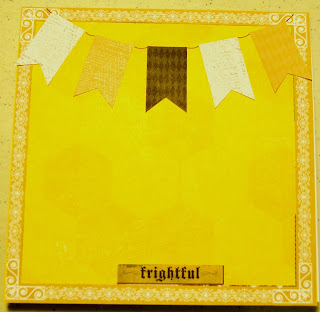
To make each card, I used a 6X12" piece of card stock folded in half.  To the front of the card I applied one stack pack paper and over that, one of the die cut frames.  Then, I added some die cut embellishments.  I left room for a halloween themed photo to be added.  Here are the 3 cards I came up with (sorry for the bad photos I could NOT get these papers to photograph well):



Okay - next.  I know I know, borders are thing of the past, but I still have a lot of clients who LOVE to scrapbook old school style, with lots of white page space and journaling directly on an album page.  And like me, I have a lot of frugal customers who like to get the most out of their supplies, making borders is GREAT for that.  I love borders because if I'm not ready to create an album page with a paper theme I like, I can create the borders, use the product while it's new and them save them for a later use.  Adding a pre-made border to a page or to a power layout makes album making go really fast - so I still like borders.
 
My customers would want to know how to make a 6" square into a 12" border so I definately wanted to make some borders with this stack pack.
 
In making the borders, I also wanted to highlight the limited edition border maker cartridges:
 
Rustic Fence Border Maker Cartridge-Ltd Ed  Pumpkin Chain Border Maker Cartridge-Ltd Ed
 
I really love both of these - especially the rustic fence which can be used for SO many other seasons!  These cartridges were a BIG hit at my event and using them to make the borders really helped people to see the possibilities.  Are you ready?  I love these borders...they are so so cute.  I was really happy with how they turned out so I hope you like them too!


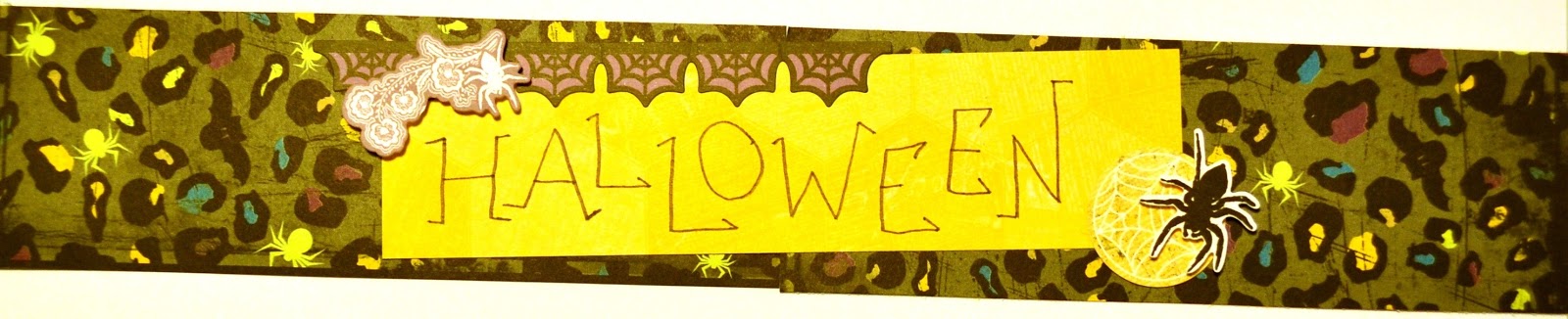
 Yes, I did add one piece of orange cardstock to my designs.  But most everything came from the stack pack.  I mostly used stack pack papers cut to 2"X6" size and then combined 2 together to make one 2"X12" border.  Most of the designs had an embellishment covering the line down the middle of the border, but really, it wasn't very noticible.  The layered stickers were so easy to peel off and stick -they were JUST the right weight of paper and I loved the dimension that came from the foam square.
 
The word HALLOWEEN in the one border was just written with the fine tip side of a black pen by hand - it's not an embellishment.
 
Once I create my designs, I mount them onto foam boards with thumb tacks and paper clips and binder clips (I do so without damaging the designs themselves) and then I display them.
 
The Hocus Pocus designs were one HALF of lesson 2.  The other half used the DREAM products to create inspiration boards - and that will be posted in another lesson.
 
Also, I like to assure all of my customers that they are able to add the hocus pocus designs to their digital pages with our digital products as well.  AND... they can EASILY get instant satisfaction by downloading them RIGHT AWAY and using them on their pages RIGHT AWAY... who can resist INSTANT? Right?
 
Finally, all these lessons I was teaching had a GAME element to them... I'll get to that in another post.  We played ONE game - with LOTS of drawings... making something from the lessons was part of the game.  For this lesson (including the DREAM designs too) I asked my customers to create something from the products I used, with the tools I used, or containing the concepts I taught - or to copy a design technique with other products that worked with the theme of their photos.  More about our game in a later post.
 
Stay tuned for more croptober lessons and ideas and happy Hocus Pocus scrapping! Sher

Croptober Tortilini Dip (croptober post # 5 of many)


Tortilini Dip is a new addition to my appetizer recipe repetoire and it's a KEEPER!  Head on over to the Fly the Coop Crafts blog to check it out.  The recipe is super easy and it was a BIG hit!  You'll LOVE it.  Happy Croptober snacking - Sher

Sunday, October 14, 2012

Croptoberfest Pinwheels: How To...

Pinwheels are the first lesson I taught at my Croptoberfest event.  I love pinwheels for several reasons.  1.  Making traditional pinwheels with paper takes only a minute.  2. It uses very few supplies and tools.  3.  It's easy to make  4.  It can add a bit of fun to just about any layout and can be made with any number of papers.  Here's how:

Cut a square from a double sided piece of paper.  Double sided can mean two different colors of paper on each side, white on one side and color on the other side OR two papers taped wrong sides together.  Any size square will work.


Here are examples of pinwheels using the Hocus Pocus stack pack paper.  I've made them from 2", 3" and 4" starting squares.  Make a dot in the middle of the square as a guide.


With a pair of scissors cut from the corner in towards the dot.  Don't go all the way to the dot.  Stop about 1/4" before the dot.  Repeat on all 4 corners.


Fold one corner into the middle and then rotate until one side of each corner is folded in towards the dot.


Here are all three sizes with the corner pieces folded in towards the middle.
 
 
Next, the middle points need to be adhered down.  This is easily done with a sticker, an embellishment or a punched shape.
 
 
Here's how mine look with a bit of bling.


Now, what to do with a pinwheel once you've made it?  Well add it to a border, a page or a card of course.  Here is another photo of my inspiration page.
 
Cheerful Dreams Scrapbook Layout Project Page Idea
 
Here is a sneak peak of my DREAM designs with a few pinwheels in the mix.


One final pinwheel tip.  At my workshops I usually have clients working on DIGITAL albums as well as traditional ones.  So, I offerend information to my digital clients so that they could add pinwheel bling to their digital pages.  In the digital world, you just have to know where to find a digital png file or embellishment of a pinwheel and here are a few places to do that.
 
2.  Classic Summer Digital Stickers
 
3.  Color My World Digital Kit
 
I hope you can find a place for PINWHEELS in your scrapping world!  Happy Croptober Scrapping!  Sher

Croptober 2012 Recipe Banana Cake!


This Banana Cake was FANTABULOUS.  You'll want to click over to my other blog and check it out!

Croptober 2012 Inspiration Sources

Copying is a good idea.  I find great ideas and inspiration from the Creative Memories facebook page, the Creative Memories project center, the Creative Memories Pinterest Boards, the Creative Memories catalog, the Pixels 2 Pages team and their Facebook page and in many other places.

When I find a good idea, I like to make it my own.  My Croptoberfest lessons were a conglomeration of good ideas I found but then made my own.  Here are some of the sources and photos that inspired me.  The one below is from the cM project center.


This layout inspired me to teach paper pinwheels.
Stay tuned for more Croptober inspiration, including the pinwheel lesson.

Happy Scrapping - Sher


Croptoberfest 2012 Revealed (first of many)

This weekend was Croptoberfest in the SherYourScraps world.  The event was held at my house and it lasted two days.  I will be sharing all the details.  First up - overview.

 
Six Lessons (inspired by the virtual Croptoberfest - thanks to cM):
Lesson 1 - Pinwheels
Lesson 2 - Design Boards (Hocus Pocus and Dream)
Lesson 3 - Ink Letters
Lesson 4 - Starburst
Lesson 5 - Magazine Inspiration
Lesson 6 - Poloroid Perfection

Yummy Food (recipes)
I'll be sharing a few of the Croptoberfest Recipes on my other blog: Fly the Coop Crafts.
Recipe 1 - Pumpkin Dip
Recipe 2 - Caramel Oatmeal Chocolate Bars
Recipe 3 - Banana Chocolate Chip Cake
Recipe 4 - Tortilini Dip

Close Ups:
Photo Montage
Hocus Pocus Designs
Dream Designs

Stay Tuned for more photos, details etc... signup on my blog to follow by email so you don't miss a post!  Happy Scrapping - Sher

Saturday, September 22, 2012

Newsprint Comic Photos

This lesson/technique is just pure fun.  I have so many page ideas I am so excited to make with this.

There is a handout for this lesson if you'd like one.  You may request the handout by email by sending a message to cmsher(at)gmail(dot)com. 

The instructions are here below.  Enjoy. AND... happy digi-scrapping!


Embellishment Paper Content

I've created a new lesson describing how to make your own designer paper using the FABULOUS Storybook Creator 4.0 software by Creative Memories.

I LOVE this software.  I can't imagine paying hundreds of dollars for Photoshop when this AWESOME package is SO user friendly yet so reasonably priced at $69.

If you are a Creative Memories consultant OR if you'd just like to have copy of this lesson in pdf format for your personal use, I'm happy to send you a copy.  Please make a request for the lesson via email at cmsher (at) gmail (dot) com.  I'll get it off to you right away.  I freely create and share my lessons.  I ask that you always credit me for the items I offer freely and that you never sell or publish my content.  Thanks!

Now enjoy the lesson -


Thursday, September 13, 2012

Digital Embellishment Buntings

I'm currently a bit obsessed with BUNTINGS... you know, rows of flags hung across a room to add a bit of decorative cheer.  Buntings are my latest love to crochet.  I will be posting about my crochet buntings on my other blog, FLY THE COOP CRAFTS...available to see now.

I love to carry my crafting over into my scrapbook world.  Recently, Creative Memories has been on the bunting band wagon too... there have been buntings on their scrapbook papers, their tools and their stickers.

Product ImageProduct Image

Product Image

So, I decided to share my technique for creating digital buntings.

I've created a 9 page lesson about them.  If you would like a pdf file of this lesson to share with your scrapbooking friends or your scrapbook clients, I'd be happy to share.  Email me at cmsher (at) gmail (dot) com and I'll send it to you.  Please make sure to request the document from an email address that can receive big files.

I'm including the pages found in the lesson in this blog post.


If you have any questions about how to create and use Digital Embellishment Buntings, don't hesitate to contact me.  Also, if you create pages with digital buntings, please consider sharing them on my FACEBOOK PAGE.

Thanks and Happy Digi-Scrapping.

To receive notice of additional scrapbook lessons, signup to receive email notification when I post or become a follower of my blog or add my blog to your feeds!

Related Posts Plugin for WordPress, Blogger...